 4K Video Downloader: A Free and Powerful Tool for Downloading Videos!
Download Here!
Introduction to 4K Video Downloader
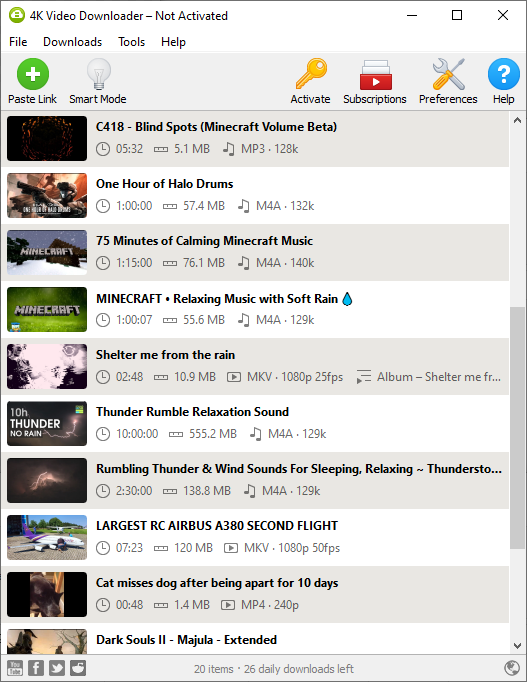
Think of this situation, you found a YouTube video that you really like watching, whether it is a music video, or a tutorial for that epic Minecraft house that you love building over and over again. Maybe you want to be able to have access to it when you have no internet. That's where 4K Video Downloader comes in. Being able to download YouTube videos in their original quality, support for playlist and channel downloads, and also the common desire for YouTube to MP3 conversion. It is as simple as copying the video URL and pasting it into the software, picking the quality settings you want and download. It also supports other platforms such as Twitch, Vimeo and more. It is available on common PC platforms, including Windows, macOS and Linux, and an Android app is available too. It is frequently updated to ensure that it supports any changes made by the platforms that could cause the software to not function correctly.
Personal review of 4K Video Downloader
I use 4K video downloader all the time, for downloading a funny clip I found online that I want to share with my friends, or saving a video I really like that I am worried will be taken down one day. I have used it to save entire playlists of music that I listen to for offline access, whether for my phone or I just want to listen to the songs without having to open them up on YouTube. Or maybe I want to use sounds or videos from one of those copyright free creative commons material that doesn't have a download link in the description. I feel safe sticking with this software. 4K Video Downloader does it all.
Additional features of 4K Video Downloader
4K Video Downloader has additional features that could be quite useful, but might not be used by most users. These include:
Downloading closed captions/subtitles along with a videoDownloading private videos (requires authentication in app)
Customisation Options
3D and 360° video support
Smart mode for seamless download of many videos with same download settings
Share your videos with others
And More!
Limitations
Instead of just listing the limitations of the free version, we should praise the free version for having all the features it comes with! Being able to download 30 videos per day, something that you will only encounter issues with when trying to mass download a music playlist or an entire YouTube channel, which you can just spread out throughout a week or so to get around this limitation. The only limitation that is unfortunate is the limit on the playlist size you can download using the free version, mainly because the options to get around it are tedious and can result in missing some videos. The two options are either, create new smaller playlists that allow the playlist download, or to just download each video separately. It can be done, but can get quite tedious. Even with this limitation, the free version is so useful that it's worth ignoring that and to just try the software. It is free after all.
Summary
4K Video downloader is always my first and only go to solution for safely downloading videos across the web, on YouTube, Twitch, it even supports TikTok and Instagram which can be useful if you don't like visiting those sites but have a friend who prompts that you watch that video they sent you. Having access to such a powerful tool on any device (sorry iPhone users, but you get what you pay for) is transformative in this day of online video. Having it be free is just an extra bonus.
Download Here!